Most people are still asking: “Which chatbot is better — ChatGPT or Gemini?”
But that’s the wrong question.
Because while the internet has been comparing chatbots, Google quietly built a full AI factory — not a chatbot. A stack of professional-grade tools that automate research, content creation, UI design, marketing, productivity, and even app development.
And the entire stack is 100% free.
This guide shows Google AI Tools BETTER Than ChatGPT, how each works, how to use them today, and how they combine into a workflow that saves hours every week — whether you’re a student, creator, or business owner.
Why Google’s AI Suite Is Different (ChatGPT Only Does One Thing)
Google didn’t try to compete with ChatGPT directly — they went bigger. ChatGPT is built to chat. Google built an ecosystem.
Google’s AI approach is heavily influenced by research from their DeepMind team — one of the leaders of multimodal AI worldwide.
Instead of just generating text, Google AI tools can:
- read your Gmail, Drive, Photos & Docs
- turn long notes into podcasts & videos
- generate UI designs, apps & tools
- build full marketing campaigns
- even analyze the live internet and produce research reports
This is not a chatbot battle anymore — this is the beginning of AI workspaces.
AI System vs AI Chatbot — The Real Difference
| Feature | ChatGPT | Google AI Stack |
|---|---|---|
| Type | Chatbot | Full ecosystem |
| Reads your files? | Limited | Yes (Gmail, Drive, Photos) |
| Build apps & tools? | No | Yes (AI Studio, Opal) |
| Generates video? | No | Yes (Veo) |
| Study & revision mode? | No | Yes (NotebookLM) |
| UI design? | No | Yes (Stitch) |
| Automatically creates campaigns? | No | Yes (Pomelli) |
ChatGPT responds.
Google’s AI works with your tools.
Why Google Built a Stack — Not a Single AI Model
Google already owns the workspace millions of people use daily — Gmail, Sheets, Docs, Photos, Calendar, Drive. So instead of building just a chatbot, they brought AI directly into those tools.
That means AI isn’t somewhere else — AI is inside your workflow.
You don’t have to tell it your context.
It already knows.
How Google Integrated Docs, Drive, Email & the Web
Google’s AI tools pull information from multiple sources — not just the prompt box.
They can search:
- your emails
- your notes
- your screenshots
- your photos
- your work files
- and the entire web — live
This allows Google AI to think with your data, not just respond to it.
Here’s how the full stack works:
| Layer | AI Tool | Purpose |
|---|---|---|
| Study & research | NotebookLM | Turns notes into quizzes, podcasts & videos |
| Command center | Gemini | Reads Gmail, Drive, Photos & web data |
| Build apps | AI Studio | Create functional tools with no code |
| Design UI | Stitch | Generate UI layouts from prompts |
| Marketing | Pomelli | Create full campaigns automatically |
| Build mini AI tools | Opal | Create your own AI assistants |
Now let’s explore each one — starting with the tool that has already changed how students study and professionals learn.
Tool #1 – NotebookLM (The AI Study & Research System)
NotebookLM is built for people who learn, research or build ideas. Instead of just summarizing notes, it turns your materials into a full learning system.
You can upload:
- PDFs
- Google Docs
- Class notes
- Web links
- Articles
NotebookLM reads everything and instantly builds a knowledge base.
Then it gives you four powerful features:
1. Audio Overview: Your Notes Become a Podcast
Click one button → your notes become a spoken podcast.
You can walk, rest, or travel — and still study.
2. Video Overview: Animated Explainer in Seconds
Not everyone learns by reading. NotebookLM creates short AI videos to explain complex topics visually.
3. Mind Map: See How Everything Connects
It auto-generates a visual map of all your topics — showing how ideas link together.
4. Quiz Mode: Tests You on Your Own Material
Before an exam, interview, or presentation — NotebookLM creates a practice test based on your own notes.
| Use Case | Outcome |
|---|---|
| Exam prep | Notes → podcast → quiz |
| Book summary | Full visual breakdown |
| Research project | Structured outline |
| Business planning | Idea mapping |
| Teaching | Lesson prep in minutes |
This alone replaces hours of manual work — and fits perfectly into workflows for students, researchers, coaches, lecturers, and startup founders.
Now let’s go from learning… to working.
Tool #2 – Gemini (Your AI Command Center)
Most people think Gemini is just Google’s version of ChatGPT — but that’s only a small part of what it does.
Gemini isn’t just a chatbot. It’s an AI command center that taps directly into your digital life — your emails, your files, your notes, your photos, even your screenshots — and turns them into usable information.
It doesn’t just talk.
It acts.
If you want to see how AI fits into the realities of African businesses — including cost, team size, and infrastructure — here’s a full guide on AI strategy for African digital businesses that explains how to apply automation step by step.
How Gemini Works Differently
Gemini connects to your:
- Gmail
- Google Drive
- Google Docs
- Google Photos
- Your browser & the live internet
This means instead of asking AI questions blindly…you can ask it to go and find information inside your personal files, analyze them, and return exactly what you need — already summarized.
Example prompt:
“Search my Gmail for the presentation the designer sent last month.
Extract the three key ideas.
Then check Google Drive for the photo of the whiteboard and summarize that too.”
Gemini:
✓ Reads your Gmail
✓ Finds attachments
✓ Scans your Drive
✓ Reads handwriting from photos
✓ Delivers a structured report
This is not a chatbot.
It’s a personal AI assistant.
Deep Research Mode — Live Web Analysis
Gemini can analyze the live internet — not just stored knowledge. You can ask for intelligent research reports, trending data, even financial analysis.
Example:
“Give me a 1,000-word analysis on the future of electric vehicles in Africa.
Use Q3 2024 data and cite sources.”
Gemini scans the web in real time and produces a structured research paper.
| What You Ask | What Gemini Delivers |
|---|---|
| Market research | Trend analysis + sources |
| Competitive study | Feature breakdown |
| Industry insights | Graphs + summaries |
| Report drafting | Structured document |
This alone can replace:
✔ Hours of research
✔ Expensive analyst tools
✔ Multiple Google searches
Gemini Can Create — Not Just Analyze
A full creative brief was given:
“Create an ultra-realistic 16:9 hero image for a premium coffee brand… matte black ceramic mug… soft morning light… scattered beans… plant in the background…”
Gemini generated a professional image ready for a landing page.
No stock photos. No designer. No revisions.
This isn’t AI for fun —this is AI for production.
Gemini + VEO (AI Video Generation)
If images are the future…video is the edge.
Gemini integrates with Veo — Google’s AI video tool. You can animate an image, add motion, move the camera, and generate an entire 1080p cinematic video clip:
“Animate steam rising from the coffee mug, push in slowly for 5 seconds. Make it look cozy.”
Gemini creates a usable ad-ready video — no videographer, no editor, no monthly B-roll subscription.
Who Should Be Using Gemini Right Now?
| Profession | Use Case | Output |
|---|---|---|
| Students | Research papers | Structured findings |
| Freelancers | Client briefs | Summaries + ideas |
| Business owners | Strategy research | Market insights |
| Content creators | Visual assets | Images + videos |
| Teams & SMEs | Workflow optimization | Document automation |
Why Gemini Is a Big Shift in AI
| AI Model | Purpose |
|---|---|
| ChatGPT | Conversation |
| Gemini | Intelligent action inside your workspace |
Gemini doesn’t just respond — it works with your files, your data, and even your creative briefs. It treats your digital life as inputs — and turns them into ready-to-use outputs.
That’s the difference between a chatbot… and a command center.
Tool #3 – Google AI Studio (Build AI Apps Without Coding)
Imagine describing a tool — just with plain words — and AI immediately builds it for you.
Not a detailed chat response.
A working app. With inputs. Buttons. Output logic.
In less than a minute.
That’s exactly what Google AI Studio does.
It turns ideas into working tools — instantly.
Developers who want to test this further can explore Google’s official documentation for building multimodal apps with AI Studio.
How It Works
Instead of writing code or hiring a developer, you simply give AI a structured prompt:
“Build a simple app.
One text input for product name.
Another input for three key features.
Then, a button that generates five Gen Z-style product descriptions for Instagram.”
Seconds later, a real app appears on screen. With text boxes. With a button. With functional output. You don’t even need to understand JavaScript — the logic is built for you.
Now you can test it, edit it, and even share it with your team or clients.
Why This Matters
For freelancers, creators, entrepreneurs, and SMEs — this is a productivity engine. Not to build “big apps” — but to replace repetitive work that wastes time daily.
If you’re a content creator or marketer, you can see how AI tools already help people repurpose and distribute content efficiently in this breakdown on AI for content workflows.
| Real Problem | AI Studio Solution |
|---|---|
| Writing the same email repeatedly | Build an email-response generator |
| Turning briefs into ad copy | Create a quick copy generator |
| Rewriting proposals | Create a “polite response” tool |
| Content ideation | Build a tweet/post idea generator |
| Client onboarding | Build a questionnaire tool |
Instead of asking AI every time —you build a mini tool once…and reuse it every day.
Temperature Control — The Personality Dial
Every AI tool inside AI Studio has a temperature slider — this controls how creative or factual the output should be.
| Temperature | AI Personality | Best For |
|---|---|---|
| 0.0 | Precise, robotic | Data, research, scripting |
| 0.5 | Balanced | Emails, reports, business content |
| 0.9 | Creative, risky | Brainstorming, marketing angles |
You don’t just write prompts.
You control the mind generating them.
AI Studio Live — Real-Time AI Collaboration
This is the most underrated feature.
You click Share Screen, and AI watches what you do — like a creative partner.
Example use:
“Hey Studio, look at my Figma design. Tell me three ways to make it stronger.”
AI responds with real-time guidance — based on what it sees on your screen.
This isn’t AI assistance. It’s AI collaboration.
It sees context. It gives you improvement suggestions.
It helps with real tasks — not theoretical chat responses.
The Real Workflow: AI Studio + Stitch
If AI Studio builds the logic — Stitch builds the design.
Together, they become a zero-code app building pipeline:
| Step | Tool | Purpose |
|---|---|---|
| 1 | AI Studio | Build functionality |
| 2 | Stitch | Generate a UI design |
| 3 | Combine | You get a usable web tool |
Meaning?
You don’t need a developer.
You don’t need a designer.
You just need clarity.
Who Should Use AI Studio Today?
| User Type | Use Case |
|---|---|
| Students | Study tools & productivity apps |
| Freelancers | Client workflow tools |
| Agencies | Proposal & copy generators |
| SMEs | Lead forms & task automations |
| Creators | Content repurposing tools |
| Developers | UI prototyping |
| Educators | Interactive lesson helpers |
Tool #4 – Stitch (Instant UI Design From a Prompt)
At this point, AI Studio has already built the brain of your tool…
But it still looks like a developer prototype — functional, but ugly.
That’s where Stitch comes in. Stitch generates professional UI designs from plain text instructions — ready for websites, landing pages, dashboards, apps, and client prototypes.
You describe what you want — and it renders the interface with layout, spacing, colors, fonts… even personality.
How Stitch Works (Real Example)
Here’s a real prompt used:
“I need a UI for an ad copy generator.
Give me a cozy minimalist vibe for a coffee brand.
One text input for product name,
a second input for key features,
and a generate button.
Show five results in clean cards below.”
Stitch produces:
✔ Full layout
✔ Inputs & buttons
✔ Visual styling
✔ Font & spacing
✔ A responsive UI
✔ Ready to embed
In less than five seconds.
That means early-stage founders, freelancers, creators, or designers can present prototypes immediately — even without a full tech team.
AI Studio + Stitch = Zero-Code App Pipeline
| Role | Tool | What It Does |
|---|---|---|
| Logic | AI Studio | Generates app functionality |
| Design | Stitch | Generates UI/UX interface |
| Final Output | Combined | A launch-ready mini product |
You:
- Create the logic in AI Studio
- Design the interface in Stitch
- Copy the UI code
- Paste it back into your AI Studio tool
- You now have a working product — built in minutes
This is how a freelancer can build a real tool… without hiring developers or designers.
Why Stitch Matters
| Benefit | Impact |
|---|---|
| No coding & no design background needed | Saves months of learning |
| Works with AI Studio tools | Becomes a full pipeline |
| Great for prototypes | Pitch-ready in minutes |
| Easy edits & iterations | Change anytime |
| Client-ready output | Sell or present visually |
Who Should Use Stitch Right Now?
| User Type | Benefit |
|---|---|
| Freelancers | Turn ideas into prototypes for clients |
| Small agencies | Pitch tools & UI without design teams |
| Startups | MVPs without big budgets |
| Course creators | Build interactive learning tools |
| Creators | Branded content wheels & calculators |
| Solopreneurs | Test business ideas fast |
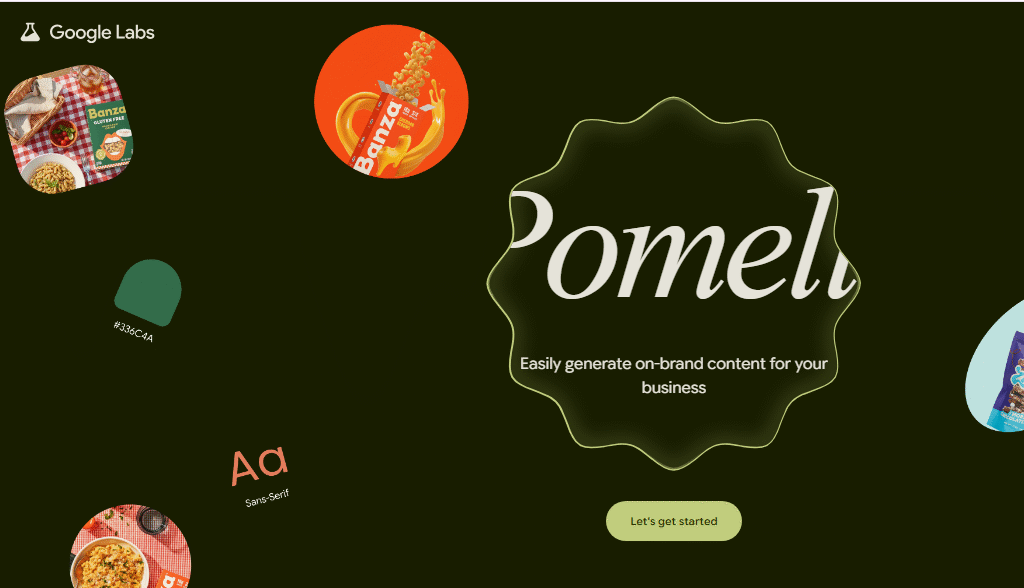
Tool #5 – Pomelli (Your Marketing Agency in a Box)
Once your product, tool, course, or idea is ready, another challenge begins:
How do you promote it without wasting hours?
How do you produce consistent content without burnout or a marketing team?
That’s where Pomelli becomes the most practical AI tool in this entire stack. It doesn’t just generate content — it studies your brand automatically, then creates full campaigns that match your design, tone, and identity.
How Pomelli Works
You don’t even need to describe your brand.
You just paste your website link.
Pomelli scans your page and instantly extracts:
- Your brand colors
- Tone of voice
- Fonts
- Structure
- Personality
- Visual identity
Then — with just one prompt — you can generate:
✔ Social media campaigns
✔ Instagram & Facebook posts
✔ Ad captions
✔ Marketing hooks
✔ One-week content plans
✔ Seasonal promo ideas
Example prompt used:
“Generate a one-week social media campaign for a fall latte special. I need 3 Instagram posts and 3 X posts in a cozy tone of voice.”
Output:
- Ready-to-post captions
- Perfect color-matched visuals
- Tone that fits the brand
- Platform-ready formatting
All in one click.
What Pomelli Replaces
| Traditional Task | Before | With Pomelli |
|---|---|---|
| Client analysis | Manual research | Auto brand scan |
| Content calendar | 2 hours | 10 seconds |
| Social media captions | Trial and error | AI-branded outputs |
| Visuals & layouts | Canva, designer | Generated instantly |
| Campaign ideas | Brainstorming | AI ideation |
This isn’t a “copy generator.”
It thinks like a creative team — and acts like an agency.
Who Should Use Pomelli
| User Type | Use Case |
|---|---|
| Freelancers | Present campaigns to clients |
| Creators | Create weekly content faster |
| SMEs | Test ideas before hiring agencies |
| Coffee shops, fashion stores, restaurants | Promote locally with branded content |
| Solopreneurs | Maintain online presence without burnout |
| Agencies | Accelerate ideation & mockups |
Why Pomelli Matters
Pomelli solves a problem most AI tools ignore:
Content creation is NOT the hardest part.
Brand consistency is.
That’s the difference.
It doesn’t just write — it matches identity.
Real Workflow: Build → Design → Promote
| Workflow Stage | Google AI Tool |
|---|---|
| Build tools & logic | AI Studio |
| Design UI | Stitch |
| Convert brand to campaign | Pomelli |
This forms a zero-cost production pipeline — build products AND market them — without hiring a developer, designer, or agency.
Tool #6 – Opal (Build Your Own AI Tools in 30 Seconds)
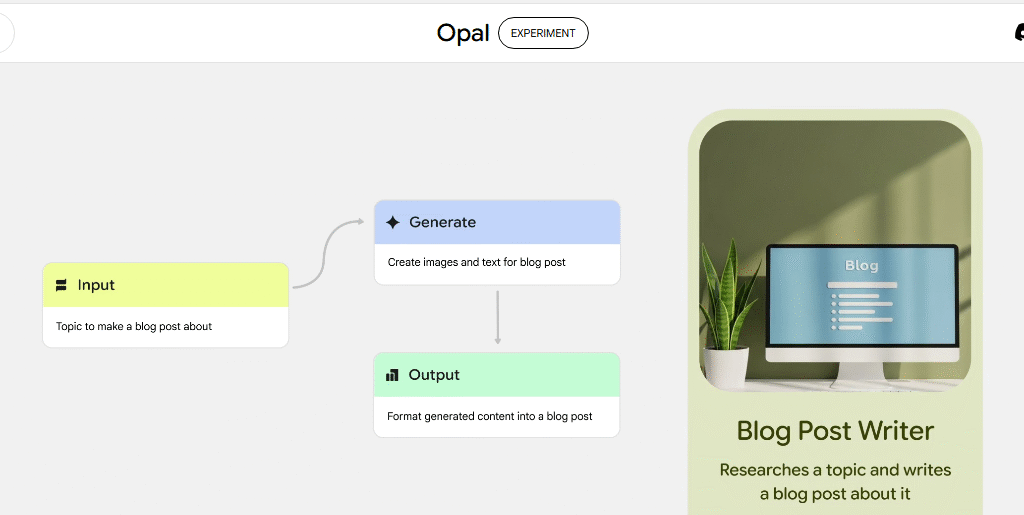
Opal is the most powerful idea in this entire Google AI stack — because instead of using AI tools… you can build your own, even if you don’t know how to code.
That means:
- If you keep writing the same emails → build an email tool
- If you keep summarizing PDFs → build a summary tool
- If you get stuck writing captions → build a caption generator
- If a client always asks the same questions → build a “reply assistant”
Instead of asking AI every time — you create a reusable AI assistant for your problem.
All you need is one clear sentence describing what you want.
And Opal converts it into a real, working app with buttons, inputs, logic, and output.
How Opal Works
Here’s the exact example used:
“I need a tool.
It needs one big text box for a formal email,
and two buttons:
- Translate to simple English
- Draft a polite ‘no thank you’ reply.”
Opal instantly generated a real tool:
✔ Input box
✔ Two functional buttons
✔ Polite email response
✔ Ready to use — or share with others
You click publish… and it becomes a live app.
You can bookmark it. Use it daily. Share it with clients.
Without ever writing one line of code.
Why Opal Is a Breakthrough
| Problem | What Opal Does |
|---|---|
| Too many AI prompts | Turns them into ONE tool |
| Repeating tasks daily | Automates them instantly |
| No coding knowledge | You only need language |
| Custom workflows | Become reusable tools |
| AI fatigue | Becomes AI clarity |
This is more than efficiency —
it’s ownership of your workflow.
You’re no longer just “using AI.”
You’re building AI that works for you.
Ideas You Can Build in Opal Today
| Tool Idea | Who It Helps |
|---|---|
| Instagram caption generator | Creators & SMEs |
| Lead follow-up message builder | Agencies & freelancers |
| Formal → simple language converter | Students & professionals |
| Weekly planner tool | Business owners |
| Resume helper | Job seekers |
| Tweet idea generator | Content creators |
If you can describe it, Opal can build it in seconds.
Who Should Start Using Opal Right Now?
| User Type | Use Case |
|---|---|
| Creators & freelancers | Convert repeat tasks into reusable tools |
| Agencies | Build client tools and charge for them |
| Founders | Test MVP ideas in 1 hour |
| Consultants | Build “toolkits” to position expertise |
| Students | Create study aids & revision helpers |
Putting It All Together — The FULL Google AI Workflow
When you look closely, every tool in Google’s AI suite fits into a workflow — not just random features.
This is how to use them like a system, not just “a list of tools”:
| Need | Tool | Output |
|---|---|---|
| Learning & revision | NotebookLM | Notes → podcast → quiz |
| Research & ideation | Gemini | Web + file analysis, image creation |
| Building logic | AI Studio | Functional app from a prompt |
| UI & visual design | Stitch | Ready-to-use interface |
| Marketing & promotion | Pomelli | Full campaign from a single link |
| Custom tools | Opal | Mini AI assistants built in seconds |
This is why Google’s approach is different:
They didn’t build a chatbot — they built an AI production line.
Once you understand the flow, you stop asking, “Which AI tool is best?”
You start asking, “Which part of my workflow can AI handle today?”
ChatGPT vs Google AI Stack — Final Comparison Table
| Feature | ChatGPT | Google AI Stack |
|---|---|---|
| Type | Chatbot | Full AI ecosystem |
| Multimodal (image/audio/video) | Partial | Full |
| Data Source | Web only | Web + Gmail + Drive + Photos |
| Build apps/tools | No | Yes (AI Studio & Opal) |
| Generate video | No | Yes (Veo) |
| Pricing | Paid ($20/mo) | Mostly free |
| Workflow approach | One tool | Complete pipeline |
| Reusable tools | Not native | Yes — shareable tools |
| Workspace integration | Limited | Native Google Workspace tools |
ChatGPT helps you write.
Google helps you build.
That’s the difference. One assists your ideas. The other turns them into working systems.
Final Take — ChatGPT Is a Tool. Google Built a System.
Most people are still fighting over which chatbot writes better paragraphs. But the future advantage will not belong to people who chat with AI — it will belong to those who build with AI.
Your unfair advantage is not another chatbot.
Your unfair advantage is a workflow.
When your tools can think, design, create, market, and build with you —you’re no longer just using AI.
You’re building an automated version of yourself.
That’s what Google quietly released.
And most of the world still hasn’t noticed.
Now you have.
Your advantage starts when you use these tools like a system — not a trend.